Ultraplan: plan in the cloud
Start a plan from your CLI, refine it on Claude Code web with inline comments, then execute it in the cloud or locally. Complete Ultraplan guide.
What is Ultraplan?
Ultraplan offloads the planning phase to the cloud. You start a request from your terminal, Claude drafts the plan on Claude Code web (ouvre un nouvel onglet), and you review it in your browser with proper review tools (inline comments, reactions, interactive outline).
Your terminal stays free while the plan takes shape. When it's ready, you choose where to execute: in the cloud (with automatic PR creation) or back in your terminal.
Plan Mode vs Ultraplan: what's the difference?
Standard Plan Mode
Plan Mode (Shift+Tab or explicit request) runs entirely in your terminal. Claude drafts a plan, displays it as plain text, and waits for your go-ahead before writing code. It's a linear exchange: Claude proposes, you accept, reject, or ask for adjustments. Everything happens in the same session, and your terminal is tied up the whole time.
For a 3-file refactor, that's fine. For an architecture migration spanning 40 files, reading a 200-line plan in a terminal, giving global feedback like "change phase 3", and waiting for Claude to rewrite the whole thing gets painful fast.
What Ultraplan changes
Ultraplan takes the same idea (plan before coding) and moves it to the browser. The improvement isn't just cosmetic:
| Standard Plan Mode | Ultraplan | |
|---|---|---|
| Where planning happens | In the terminal | In the cloud (claude.ai/code) |
| Terminal during planning | Blocked, waiting | Free — keep working |
| Plan format | Scrollable plain text | Structured view with outline sidebar |
| Feedback | Global text response | Inline comments on each section |
| Iterations | Full rewrite each round | Targeted edits section by section |
| Execution | Local only | Cloud (with auto PR) or local |
| Best for | Short plans (< 50 lines) | Long plans, multi-file tasks, collaborative review |
In short: Plan Mode is a quick sketch on a sticky note. Ultraplan is a shared Google Doc with comments, an outline, and the option to delegate execution.
When to stick with standard Plan Mode
Ultraplan isn't always the right call. Standard Plan Mode works better when:
- The task is simple and the plan fits in 20-30 lines
- You want to keep the workflow fully local, no cloud dependency
- The repo isn't on GitHub (Ultraplan requires GitHub)
- You prefer a fast back-and-forth without opening the browser
Prerequisites
- A Claude Code web (ouvre un nouvel onglet) account
- A connected GitHub repository
- Claude Code v2.1.91 or later
Ultraplan runs on Anthropic's cloud infrastructure. It is not available with Amazon Bedrock, Google Cloud Vertex AI, or Microsoft Foundry.
Launch Ultraplan from the CLI
Three ways to start:
1. The /ultraplan command
/ultraplan migrate the auth service from sessions to JWTs
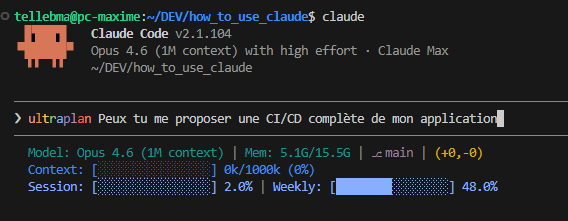
2. The keyword in a regular prompt
Just include the word ultraplan in your message:
I'd like an ultraplan to refactor the payment module
3. From a local plan
When Claude finishes a local plan and shows the approval dialog, choose No, refine with Ultraplan on Claude Code on the web. The draft moves to the cloud for further iteration.
After confirmation, a dialog asks whether you want to launch the cloud session:
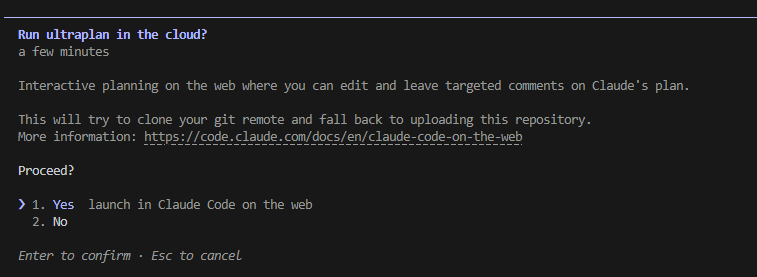
Track progress in the terminal
Once launched, your prompt shows a status indicator:
| Status | Meaning |
|---|---|
◇ ultraplan | Claude is researching your codebase and drafting the plan |
◇ ultraplan needs your input | Claude has a question — open the session link to respond |
◆ ultraplan ready | The plan is ready to review in your browser |
Type /tasks and select the ultraplan entry for details: session link, agent activity, and a Stop ultraplan action. Stopping archives the cloud session and clears the indicator — nothing is saved to your terminal.
Review and comment on the plan in your browser
When the status changes to ◆ ultraplan ready, open the session link. The plan appears in a dedicated review view with three tools:
- Inline comments: highlight a passage and leave a comment for Claude to address
- Emoji reactions: react to a section to signal approval or concern without writing a full comment
- Outline sidebar: jump between plan sections
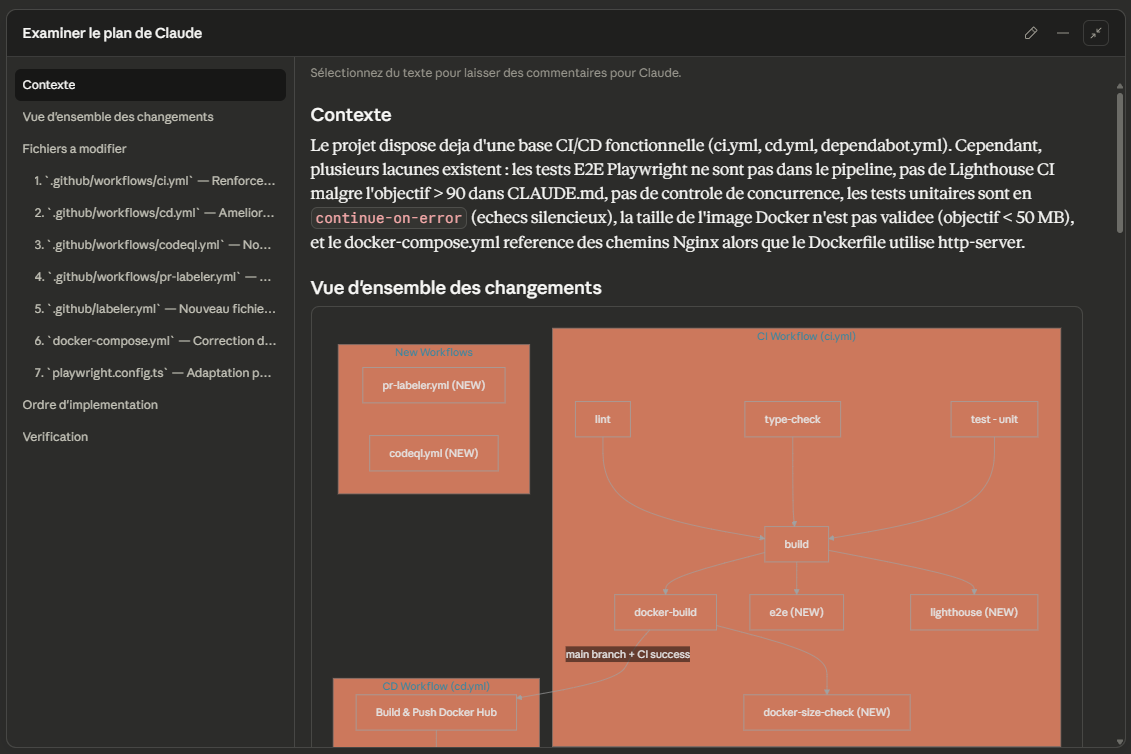
Ask Claude to address your comments: it produces a revised draft. You can iterate as many times as needed before approving.
Choose where to execute the plan
Once the plan looks right, two options from the browser:
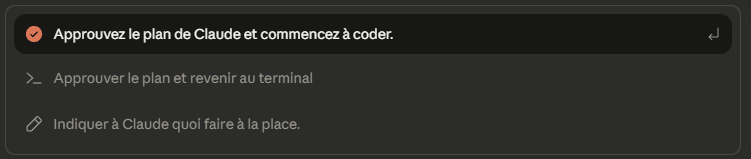
Execute in the cloud
Click Approve Claude's plan and start coding. Claude implements the plan in the same cloud session. Your terminal shows a confirmation and the indicator clears.
When the implementation finishes, review the diff and create a pull request from the web interface.
Send the plan back to your terminal
Click Approve plan and teleport back to terminal. The web session is archived to prevent duplicate work.
Your terminal shows the plan in an Ultraplan approved dialog with three choices:
| Option | What happens |
|---|---|
| Implement here | The plan is injected into your current conversation |
| Start new session | New conversation with only the plan as context |
| Cancel | The plan is saved to a file — Claude prints the path |
If you start a new session, Claude prints a claude --resume command so you can return to your previous conversation later.
Typical workflow
Here's a concrete usage scenario:
# 1. Launch the plan from the terminal/ultraplan add WebSocket support to the notification service# 2. Keep working while Claude plans# Your terminal stays available, the ◇ ultraplan indicator is running# 3. When ◆ ultraplan ready appears, open the link# → Review the plan, comment on sections that need changes# 4. Approve and choose execution# → Cloud: Claude codes and opens a PR# → Terminal: the plan comes back for local implementation
Current limitations
A few things to keep in mind during the preview:
- Requires a GitHub repository (no GitLab or Bitbucket support yet)
- Not available with third-party providers (Bedrock, Vertex, Foundry)
- Remote Control disconnects automatically
- The cloud session uses your account's default environment
Next steps
- Learn about headless mode and CI/CD to understand cloud infrastructure options
- Explore local plan mode for cases where Ultraplan isn't needed
- Check out hooks to automate actions after plan execution