Why CI/CD became a cyber question in 2026
Five years ago, a CI pipeline meant: lint + unit test + build. That was largely enough because code was written slowly, peer-reviewed, and passed through multiple brains before production.
That model no longer holds. Three changes make cyber-first CI mandatory:
1. The volume of AI-generated code is exploding
Claude Code, GitHub Copilot, Codex and Cursor now generate thousands of lines per day in an average project. A developer can merge 10x more code than two years ago. Humans no longer have the bandwidth to deep-review everything. Your CI must compensate for this attention debt.
2. AI agents make specific security mistakes
LLMs were trained on historical code, often vulnerable. They reproduce dangerous patterns: SQL injection, hardcoded secrets, unsanitized paths, ReDoS-vulnerable regex. The Snyk 2026 AI Code Security report (ouvre un nouvel onglet) (and the Purdue 2023 study (ouvre un nouvel onglet) before it) show that 30 to 50% of AI-generated code contains at least one known weakness. Without automated scanning, these vulnerabilities ship.
3. Democratization = more non-experts at the helm
Entrepreneurs, designers, PMs, students now write and deploy code in 2026. They do not necessarily know OWASP Top 10, or the difference between innerHTML and textContent. The CI must be the guard rail that their training did not provide.
What a cyber-first CI looks like in practice
Before diving into specifics, here is an example of a complete CI workflow running on a 2026 production project. Each node is an independent step that can block the merge.
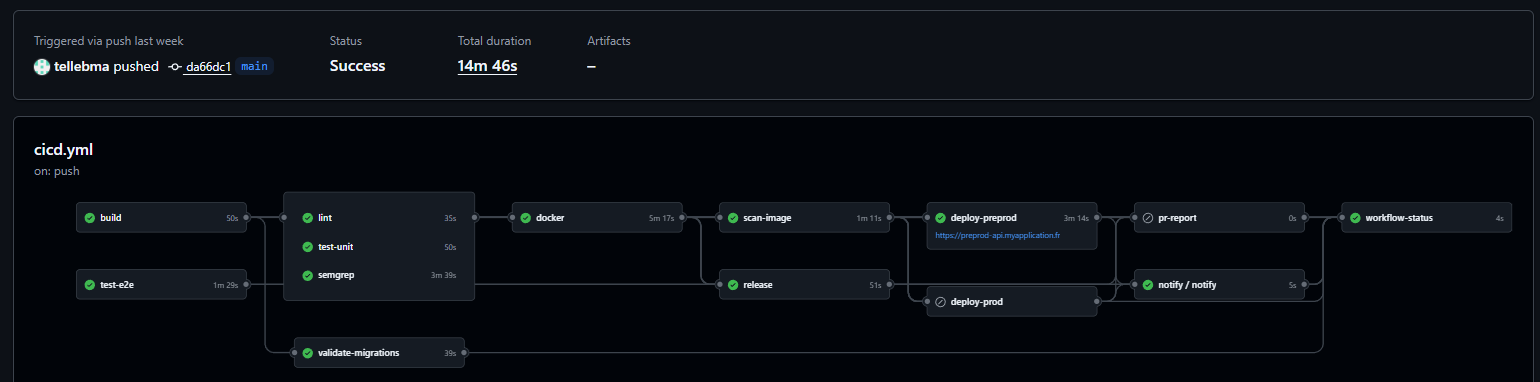
You can see the typical chain: build and tests in parallel, then lint + Semgrep scan, Docker image build, image scan, release, and preprod deploy before prod. Green boxes are steps that run on every push. A single failure stops the chain. 14 minutes total is a perfectly reasonable cost for that level of safety net.
Anatomy of a cyber-first CI in 2026
A modern CI must chain eight verification layers, in this order, fail-fast:
1. Lint + format            → style consistency
2. Type-check               → compile-time type errors
3. Unit tests                → business logic
4. Integration tests         → component interactions
5. SAST (Static App Security) → vulns in source code
6. SCA (Software Composition Analysis) → vulns in dependencies
7. Secret scanning          → accidentally committed secrets
8. IaC + Dockerfile security → infrastructure as code + containers
Add two periodic layers (not every PR but weekly):
9.  DAST (Dynamic App Security)     → tests against running app
10. Automated pen test / fuzzing    → active vulnerability discovery
Concrete tools per layer
| Layer | Open-source or freemium tools |
|---|---|
| Lint | ESLint, Biome, Prettier, Ruff (Python), golangci-lint |
| SAST | Semgrep (ouvre un nouvel onglet) (free for OSS), CodeQL (ouvre un nouvel onglet) (GitHub native), SonarCloud |
| SCA | Dependabot (ouvre un nouvel onglet), Snyk (ouvre un nouvel onglet), OSV-Scanner (ouvre un nouvel onglet) |
| Secret scanning | gitleaks (ouvre un nouvel onglet), trufflehog (ouvre un nouvel onglet), git-secrets |
| IaC scan | Checkov (ouvre un nouvel onglet), Trivy (ouvre un nouvel onglet), tfsec (ouvre un nouvel onglet) |
| Docker scan | Trivy (ouvre un nouvel onglet), Snyk Container, Grype (ouvre un nouvel onglet) |
| DAST | OWASP ZAP (ouvre un nouvel onglet), Nuclei (ouvre un nouvel onglet) |
| Fuzzing | OSS-Fuzz (ouvre un nouvel onglet), cargo-fuzz, go-fuzz |
All exist in free or free-for-OSS versions. No budget excuse to skip them on a personal project or a startup.
Red Team, Blue Team, Purple Team: understanding the model
Mature cybersecurity is not a solo effort. It rests on three complementary roles, inherited from the military world and adapted to cyber.
🔴 Red Team: "I break"
Red Teamers simulate a realistic attack. Their job is to find how to get in by thinking like an attacker. They combine OSINT (intelligence), vulnerability exploitation, phishing, privilege escalation.
Typical Red Team deliverables:
- Pentest report with custom CVEs found
- Full exploitation chain (from XSS to RCE in production)
- PoC (proof of concept) that is exploitable
- Human posture evaluation (social engineering)
Typical tools: Metasploit, Burp Suite, Nmap, Cobalt Strike, Bloodhound.
🔵 Blue Team: "I defend"
Blue Teamers build and maintain defenses. Their job is to detect, block, respond to attacks. They run the SOC (Security Operations Center), configure SIEMs, analyze logs.
Typical Blue Team deliverables:
- Incident response playbooks
- Custom detection rules (YARA, Sigma, Falco)
- Alerting and detection SLOs
- Server and config hardening
Typical tools: Splunk, ELK/Wazuh, Sigma rules, CrowdStrike, Falco.
🟣 Purple Team: "I make both teams talk"
Purple Team is not a separate role, it is a collaboration method. Red and Blue work together: Red attacks → Blue must detect → they identify blind spots → Blue adds detection → Red invents a variant → iterate.
This is the most effective model in 2026, especially for teams that cannot afford two separate squads. You do Purple Teaming yourself with tools like Caldera (ouvre un nouvel onglet) (automated MITRE ATT&CK) or Atomic Red Team (ouvre un nouvel onglet).
What to integrate into your CI in Purple Team mode
Even solo or as a startup, you can do light Purple Teaming via your CI. Here is how.
🔴 Red side (automated offense)
- Semgrep with OWASP Top 10 rules on every PR: this is your automated Red Teamer looking for vulnerable patterns
- Nuclei with templates against your staging environment (weekly or nightly)
- Fuzzing on critical endpoints: a generator sends 10,000 weird inputs, your code must hold
- Regression tests for past CVEs: every CVE you fixed must have a test that fails if regression returns
🔵 Blue side (automated defense)
- Structured logs mandatory: every HTTP request, every DB call, every AI call (!) is logged with a trace ID
- Anomaly detection in production: Sentry, Datadog or an open-source SIEM like Wazuh alerts on unusual patterns
- WAF enabled by default: Cloudflare free tier, or ModSecurity if self-hosted
- Fail2ban or equivalent: on your VPS, automatically blocks scans and brute force
🟣 CI/CD integration with feedback loop
# GitHub Actions example: minimal cyber-first CIname: security-cion: [pull_request]jobs:security:runs-on: ubuntu-lateststeps:# 1. Semgrep SAST- uses: semgrep/semgrep-action@v1with:config: p/owasp-top-ten# 2. Gitleaks secret scanning- uses: gitleaks/gitleaks-action@v2# 3. Trivy for Dockerfile + deps- uses: aquasecurity/trivy-action@masterwith:scan-type: fsscan-ref: .# 4. OSV-Scanner for deps- uses: google/osv-scanner-action@v1with:scan-args: --recursive ./# 5. Unit + integration tests- run: npm ci && npm test# 6. Gate: block merge if critical vuln found- name: Fail on criticalif: failure()run: exit 1
This CI takes 3 to 8 minutes per PR. Sounds long? It is infinitely less than handling a data breach.
A real-world example: orchestrated production CI
The minimal CI above is a good starting point. Here is a more mature example running in production, orchestrated around NestJS + Prisma + Postgres + Docker. It illustrates several techniques worth knowing: path filters, concurrency with cancellation, conditional triggers, separate preprod/prod deploy by tag, automatic PR reports.
Overall pipeline structure
build (50s)
├── lint (35s)
├── test-unit (50s)
├── test-e2e (1m29s, conditional)
├── validate-migrations (39s)
├── semgrep (3m39s, SAST)
├── docker (5m17s, build + push)
│   └── scan-image (1m11s, Trivy)
│       ├── deploy-preprod (3m14s)
│       └── deploy-prod (on tag vX.Y.Z)
├── release (semantic-release auto-tag)
├── pr-report (comment on PR)
├── notify (Discord webhook post-deploy)
└── workflow-status (final gate)
Total duration: ~14 min for a full push with preprod deploy. That is the budget to target on a serious project.
Smart triggering
on:push:branches: [ "main" ]tags: [ "v*" ] # Format: vXX.YY.ZZpull_request:paths-ignore:- '**.md'- 'docs/**'- '.gitignore'- 'LICENSE'pull_request_review:types: [submitted]issue_comment:types: [created]workflow_dispatch:concurrency:group: ${{ github.workflow }}-${{ github.ref }}cancel-in-progress: truepermissions: {}
Three points worth noting:
paths-ignoreskips the full pipeline for a README change. Saves several minutes of CI per day.concurrencywithcancel-in-progresscancels stale runs when a new commit lands on the same branch. No queue build-up.permissions: {}at the workflow level = least privilege principle. Each job explicitly re-requests the permissions it needs (contents: read,packages: write, etc.). A DevSecOps standard that too many repos skip.
Slow conditional jobs: e2e on demand
E2E tests take 1m30s. Running them on every PR push slows things down without huge benefit during iteration. The solution:
test-e2e:runs-on: ubuntu-latestif: |(github.event_name == 'push') ||(github.event_name == 'pull_request_review' && github.event.review.state == 'approved') ||(github.event_name == 'issue_comment' && github.event.issue.pull_request != null && github.event.comment.body == '/run-e2e') ||(github.event_name == 'workflow_dispatch')
E2E runs only:
- On direct push to
main(post-merge safety net) - On PR approval (last validation before merge)
- On
/run-e2ecomment in a PR (manual trigger) - On workflow dispatch (manual)
Result: fast PRs during iteration, full validation at the decisive moment. A form of light Chaos Engineering: the pipeline adapts its depth to context.
Ephemeral Postgres services for tests
A recurring problem: unit tests that touch the DB need a real Postgres, not mocks. GitHub Actions lets you spin up Docker services on the fly:
services:postgres:image: postgres:17-alpineenv:POSTGRES_USER: testuserPOSTGRES_PASSWORD: testpassPOSTGRES_DB: testdboptions: >---health-cmd pg_isready--health-interval 10s--health-timeout 5s--health-retries 5ports:- 5432:5432
The DB runs, tests hit it, it gets thrown away at job end. No secret to manage, no shared DB polluted between runs. This is the equivalent of a hermetic test environment, free, reproducible.
Migration validation before deploy
A dedicated validate-migrations job ensures Prisma migrations are consistent, even with a shadow database:
- name: Validate Prisma migrationsenv:DATABASE_URL: postgresql://migration_test:migration_test@localhost:5433/testdb_migrationrun: |set -euo pipefailnpx prisma migrate deploynpx prisma migrate diff \--from-schema-datamodel prisma/schema.prisma \--to-migrations prisma/migrations \--shadow-database-url "postgresql://migration_test:migration_test@localhost:5433/shadow_db" \--exit-code
Catches migrations that compile but diverge from the schema (forgotten prisma migrate dev), or those that would break the DB on deploy. This check alone has saved several prod deploys in real projects.
Image scan with Trivy as SARIF
Once the Docker image is built, it goes through Trivy to detect CVEs in layers:
# SECURITY: Trivy was compromised in a supply chain attack (March 2026).# Only SHA 57a97c7 (v0.35.0) is verified safe. Do NOT update without verification.- name: Run Trivy vulnerability scanner (SARIF)uses: aquasecurity/trivy-action@57a97c7e7821a5776cebc9bb87c984fa69cba8f1 # v0.35.0 (verified safe)with:image-ref: ${{ needs.docker.outputs.image-tag }}format: sarifoutput: trivy-results.sarifseverity: CRITICAL,HIGH- name: Upload Trivy scan resultsuses: github/codeql-action/upload-sarif@ff0a06e83cb2de871e5a09832bc6a81e7276941f # v3.28.18with:sarif_file: trivy-results.sarif
Two critical things here:
- SHA pin mandatory on sensitive actions. The comment explains that Trivy was compromised in a supply chain attack in March 2026. Only a verified-safe SHA is allowed.
@latestor@v0would be an open door. - SARIF format uploaded to GitHub Security tab. CVEs found show up in the Security tab of the repo, correlated with Dependabot alerts. A single place to see the full security posture.
Per-environment deployment with approvals
deploy-preprod:environment:name: preprodurl: https://preprod-api.example.comif: |(github.ref == 'refs/heads/main' ||(github.event_name == 'pull_request' && contains(github.event.pull_request.title, '[DEPLOY]'))) &&needs.build.result == 'success' &&needs.lint.result == 'success' &&needs.test-unit.result == 'success' &&needs.semgrep.result == 'success' &&needs.docker.result == 'success' &&needs.scan-image.result == 'success'deploy-prod:environment:name: productionurl: https://api.example.comif: startsWith(github.ref, 'refs/tags/v') # vX.Y.Z tag only
Two combined safety mechanisms:
- GitHub Environments: manual approval required before prod deploy (configurable via the UI). Even if the workflow fires, it waits for a human to validate.
- Explicit dependencies: prod deploy cannot start unless all upstream jobs passed. No "push and deploy without tests" shortcut.
Automatic PR report
After each run on a PR, a comment summarizes the whole pipeline inside the PR:
pr-report:needs: [build, lint, test-unit, test-e2e, semgrep, docker, scan-image, deploy-preprod, deploy-prod]if: always() && (github.event_name == 'pull_request' || ...)steps:- name: Generate PR reportrun: ./.github/scripts/generate-pr-report.sh- name: Comment PRrun: node ./.github/scripts/publish-pr-comment.cjs
With if: always(), the report runs even if upstream jobs failed. The reviewer sees at a glance: build green, unit tests green, semgrep finds 2 findings, preprod deploy OK. Huge reduction in review friction.
Post-deploy Discord notification
notify:if: always() && (needs.deploy-preprod.result != 'skipped' || needs.deploy-prod.result != 'skipped')uses: ./.github/workflows/discord-notify.ymlwith:environment: ${{ needs.deploy-prod.result != 'skipped' && 'PRODUCTION' || 'PREPROD' }}status: ${{ needs.deploy-prod.result != 'skipped' && needs.deploy-prod.result || needs.deploy-preprod.result }}url: ${{ needs.deploy-prod.result != 'skipped' && 'https://api.example.com' || 'https://preprod-api.example.com' }}
The team gets notified as soon as a deploy goes out (success or failure). For the Blue Team, this is the first signal to check nothing is broken. It is also an immediate audit trail.
Workflow-status: the final gate
workflow-status:needs: [build, lint, test-unit, test-e2e, validate-migrations, semgrep, docker, scan-image, ...]if: always()steps:- name: Check workflow statusrun: |if [[ "$BUILD_RESULT" == "failure" ]]; then exit 1; fiif [[ "$LINT_RESULT" == "failure" ]]; then exit 1; fiif [[ "$TEST_UNIT_RESULT" == "failure" ]]; then exit 1; fiif [[ "$SEMGREP_RESULT" == "failure" ]]; then exit 1; fiif [[ "$DOCKER_RESULT" == "failure" ]]; then exit 1; fi# E2E conditional: OK to be skippedif [[ "$TEST_E2E_RESULT" == "failure" ]]; then exit 1; fiecho "All critical jobs succeeded"
A final job that consolidates everything. Its status is the required status check on the protected main branch: impossible to merge if this job is red. All gates in one place.
Classic mistakes to avoid
❌ Having a CI that "always passes"
If your CI has been green for 3 months without ever alerting, it is not that it works. It is that it tests nothing. Force a voluntary fail from time to time to validate the gates work.
❌ Disabling Dependabot because "too many PRs"
Dependabot alerts that annoy you are proof that your stack carries security debt. The solution is not to disable, it is to auto-merge patch/minor updates (via automerge (ouvre un nouvel onglet) with CI validation).
❌ Running security scanning after deployment
A vulnerability detected in production, even fixed in 2 hours, has been exposed for 2 hours. Scan must happen before merge, not after.
❌ Copy-pasting Semgrep rules without understanding them
False positives push you to disable rules, and in 3 months the suite is broken. Take the time to understand each rule, mark exclusions explicitly with // nosemgrep: rule-id — reason.
❌ Ignoring the supply chain
npm install downloads 1000 transitive packages. One maintained by a compromised account can inject malware. SCA scans are not enough: you must also pin versions (lockfile) and consider a private registry (Verdaccio, Artifactory) that caches packages.
Action plan for the next 4 weeks
Week 1: baseline activation ($0 budget)
- Dependabot enabled on all GitHub repos (free)
- Gitleaks as pre-commit AND in CI
- Semgrep with
p/owasp-top-tenpack in CI - OSV-Scanner on deps on every PR
-
.gitignore+.dockerignorere-read and completed for sensitive patterns
Week 2: infrastructure hardening
- Trivy scan of Dockerfile + final image
- Checkov on all
docker-compose.yml, Terraform, Kubernetes files - Cloudflare WAF enabled (free up to a volume)
- Security headers: CSP, HSTS, X-Frame-Options, Referrer-Policy
Week 3: detection and observability
- Structured logs everywhere (JSON, not raw text)
- Sentry or equivalent on frontend AND backend
- Alerting on suspicious patterns (500 spikes, repeated auth failures)
- GitHub-exposed secrets monitoring (automatic alert via Secret Scanning)
Week 4: light Purple Teaming
- Install Caldera (ouvre un nouvel onglet) or Atomic Red Team (ouvre un nouvel onglet) in an isolated lab
- Run 3 simple ATT&CK scenarios (exfiltration, persistence, lateral movement)
- Verify your logs/alerting detect the 3 scenarios
- Document blind spots to close in week 5+
Signals that your cyber CI works
When the cyber CI is well calibrated, you observe:
- At least one alert per month on a transitive dep vuln (= your scanner works)
- False positives < 10% in SAST (= your rules are calibrated)
- No secret ever reaches Git history (= gitleaks + git-secrets work)
- Devs complain sometimes because CI blocks their PR (= CI does its job)
- MTTD (Mean Time To Detect) < 1 day on production incidents (= your Blue side detects fast)
- No critical CVE on your stack older than 7 days without a merged fix (= your patch process runs)
If everything is too silent, first check that the CI actually tests something. Silence in cybersecurity is almost always a bad sign.
AI agents change the game, use them
In 2026, cyber itself can benefit from AI agents. Not to replace humans, but to industrialize what is repetitive:
- Automated Dependabot alert triage: an agent reads the CVE, evaluates real exposure (is this function used?), proposes an upgrade PR with tests
- PR security review: an agent comments PRs with detected OWASP risks before the human even touches it
- Intelligent fuzzing: an agent generates adversarial inputs based on the code (far more efficient than a random fuzzer)
- Sigma/YARA detection generation: from a new IoC, an agent writes the detection rule
Claude Code is particularly well positioned for these use cases because it understands your codebase, not just an isolated file. See the security-review Skill for a concrete example.
Further reading
- Leaked Anthropic API key? Step-by-step recovery — post-incident in emergency
- Never give Claude Code your API keys — primary prevention
- MCP security — the new attack vector via AI connectors
- Claude Code permissions and sandbox — local isolation
- OWASP Top 10 2021 (ouvre un nouvel onglet) — reread every year
- MITRE ATT&CK (ouvre un nouvel onglet) — attack tactics taxonomy
- CISA KEV Catalog (ouvre un nouvel onglet) — actively exploited vulns, top priority